Import & Export Data

Contents
It is possible to export table data to an Excel file and to import table data from either a secondary database or an Excel sheet.
 To export or import multiple tables, respectively to or from a single Excel file, please use the 'Multi Table Selection' functionality.
To import multiple tables from a secondary database, please use the 'Import Project Data' functionality from the main menu File > Import > Project from Secondary....

1.Open a data table 2.click the 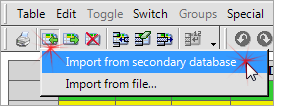 3.click Yes to confirm and the table's data will be replaced by the data from the corresponding table in the secondary database.
|


1.Open a data table 2.click the  3.select an appropriate Excel file 4.select the sheet from the Worksheet box  5.if the selected Excel file is created by PLE (using Multi Table functionality or using export table data to Excel file) then leave the other fields unchanged 6.click on the OK button to import and the table's data will be replaced by the data from the selected sheet from the selected Excel file.
|
1.Open a data table 2.click the 3.the currently visible data will be exported.
|

ImExport (last modified: Sep 21, 2025)
See also: